Windows 10 / 11 · Version 1.0
HireSign

Sign PDFs on your PC with your mouse, a digital pen or your touchscreen. Draw your signature once, tap where it goes, add the date and save. No printing, no scanning, and your documents never leave your computer.

£1one-off · perpetual licence · no subscription
Buy — £1 →
🆓 Pro free for 14 days. Every download includes Word signing and typed signatures for your first two weeks. After that you keep everything below, forever.
📄 Need to sign Word documents? HireSign Pro adds .docx signing plus typed and uploaded signatures — £9.99, or £8.99 if you've bought HireSign.
Feels like pen on paperLine thickness follows your pen pressure or writing speed
Any inputMouse, touchscreen, Surface Pen or graphics tablet — with palm rejection
Fill in formsInitials, today's date, text, ticks and crosses in one click each
Right-click to sign"Sign with HireSign" appears on PDF files in File Explorer
Private by designWorks offline. Nothing is uploaded and there's no account
Your original stays safeSaves a separate signed copy — move, resize or undo until you're happy
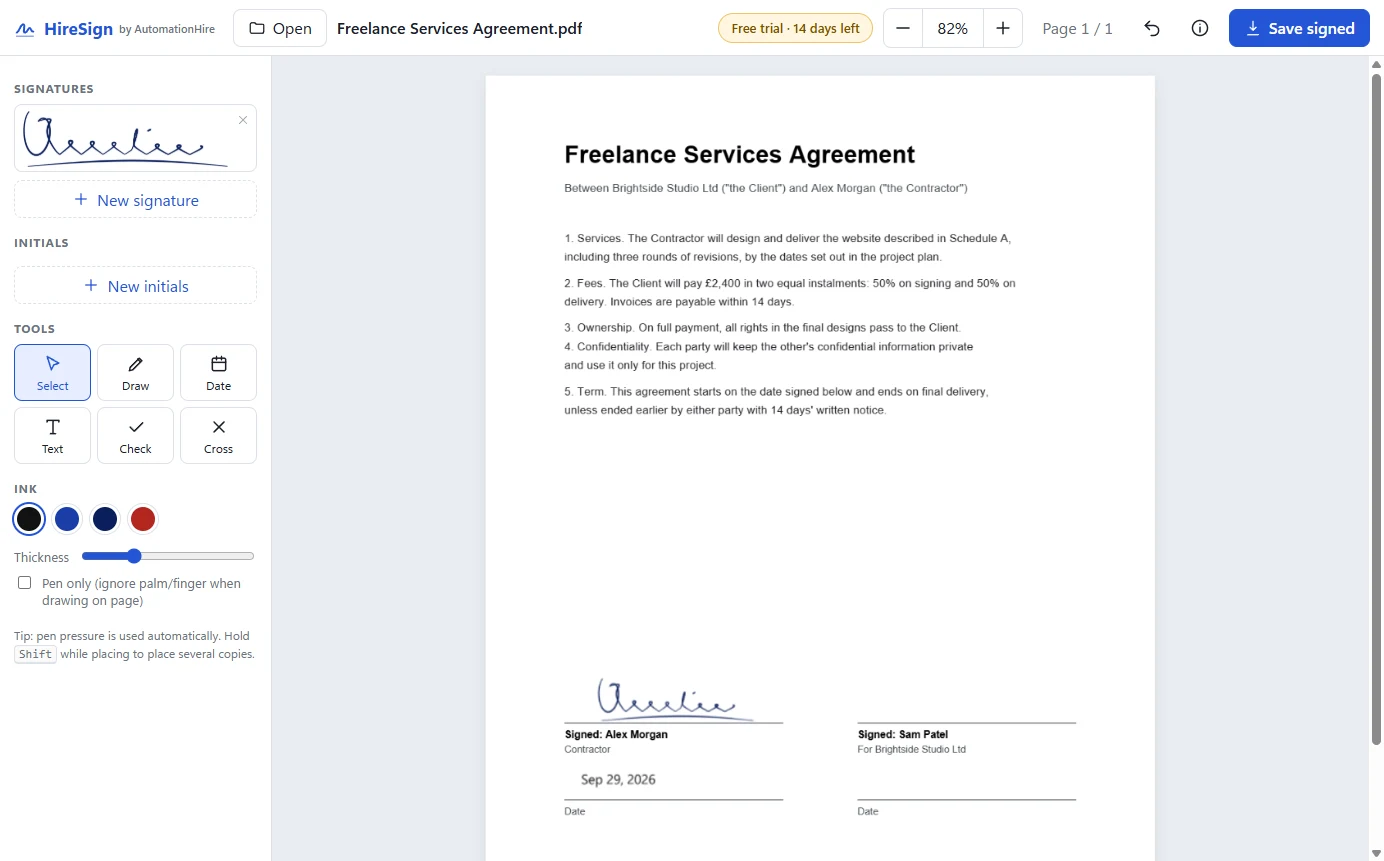
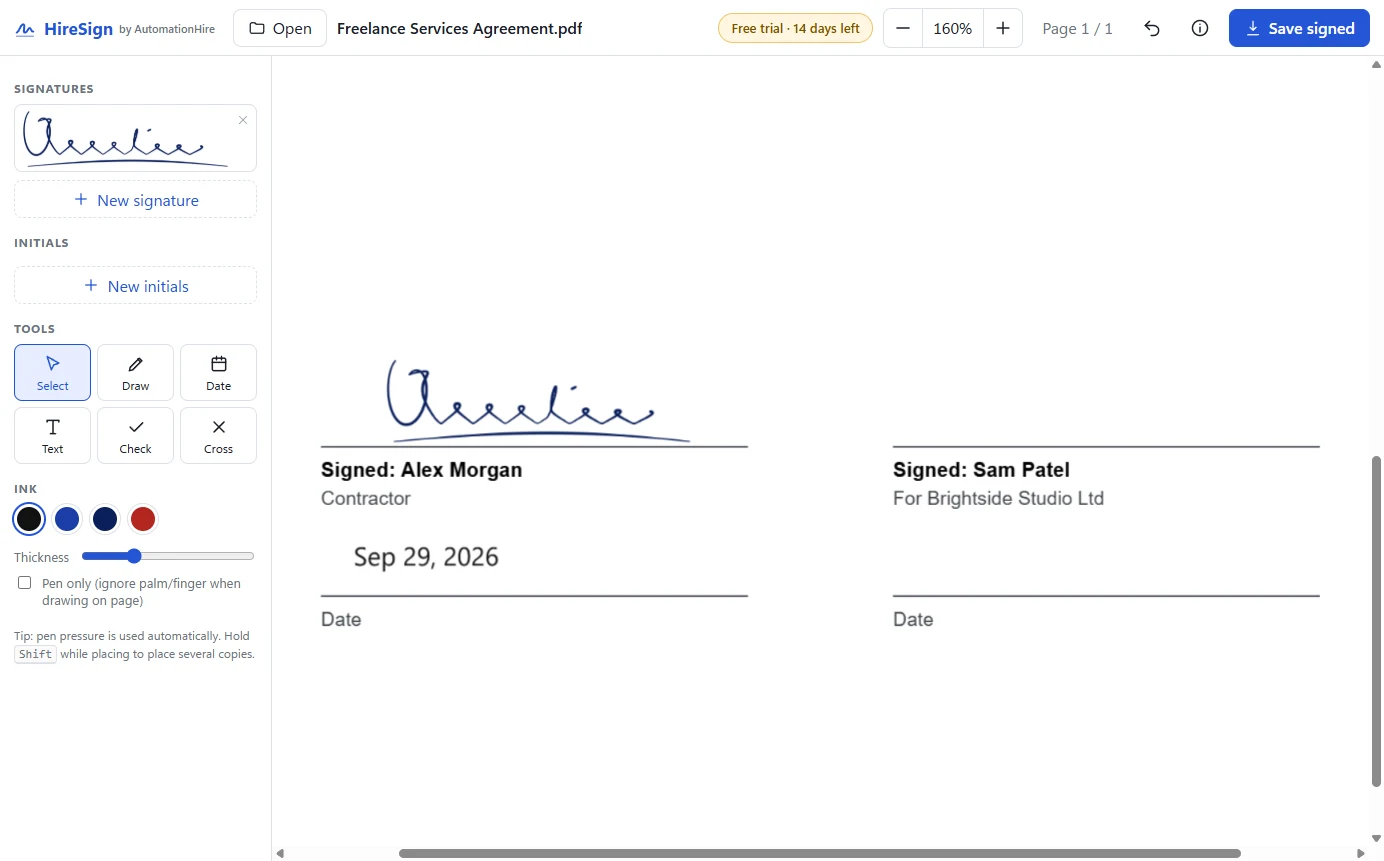
HireSign with a signed freelance services agreement
Real screenshot: a contract signed and dated in HireSign.
See it in action

HireSign with a signed freelance agreement open
A contract signed and dated: tap where it goes, then save
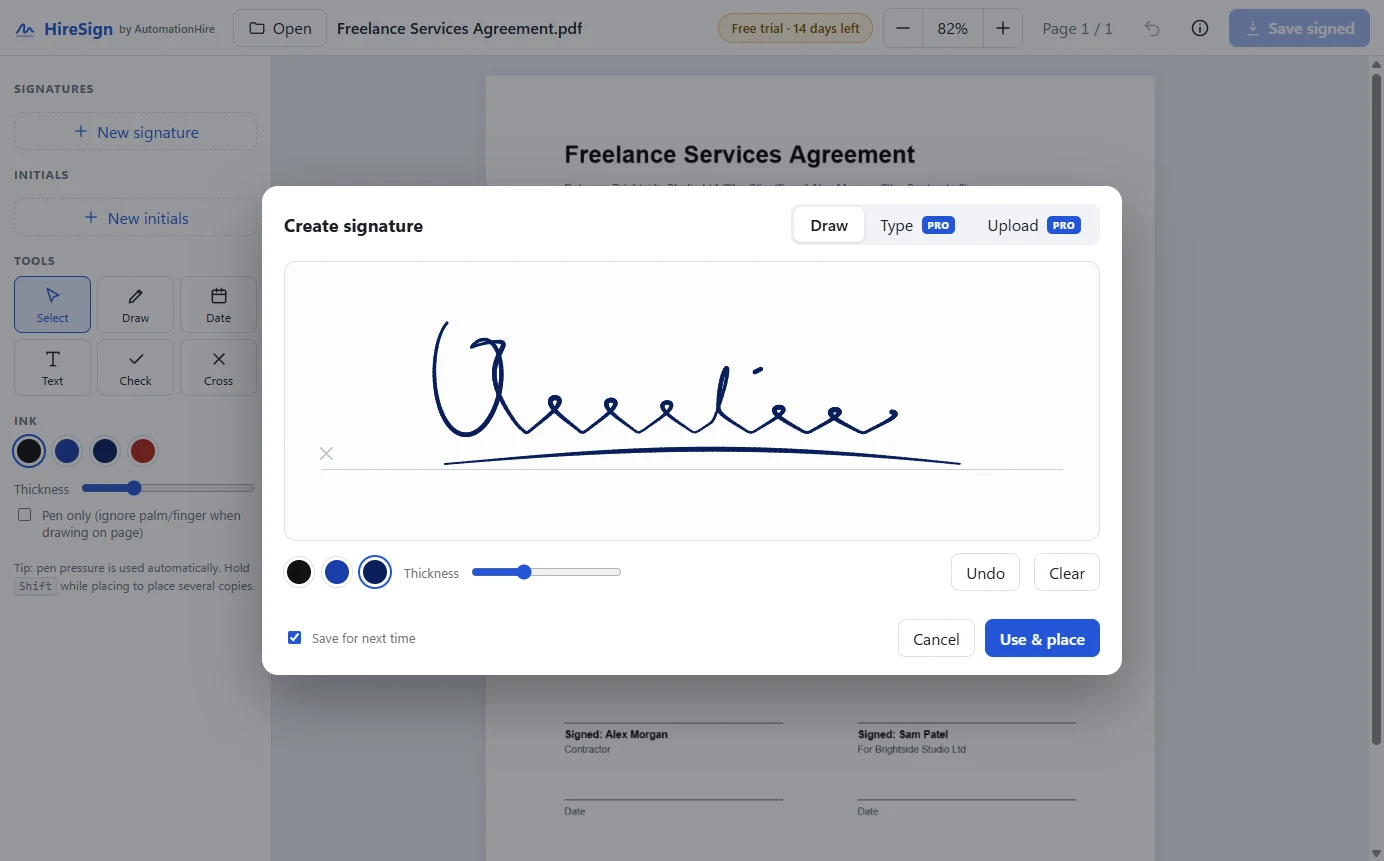
HireSign signature pad with a drawn signature
Draw your signature once with a mouse, pen or finger. It's saved for next time
Close-up of a pen-pressure signature on a document
Pen pressure makes it look like real ink
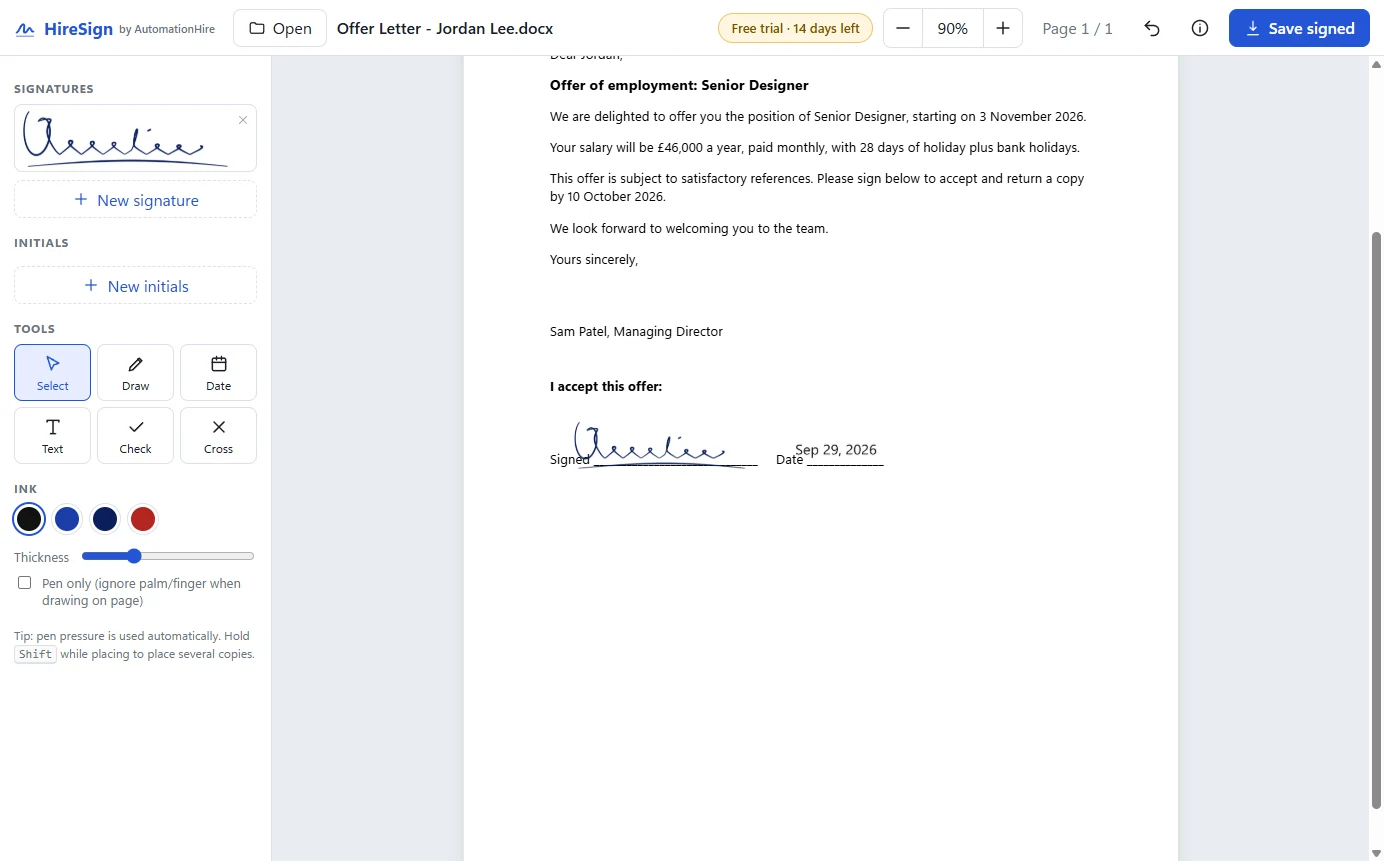
Signing a Word offer letter in HireSign
Pro: sign Word documents and save as PDF or back to Word
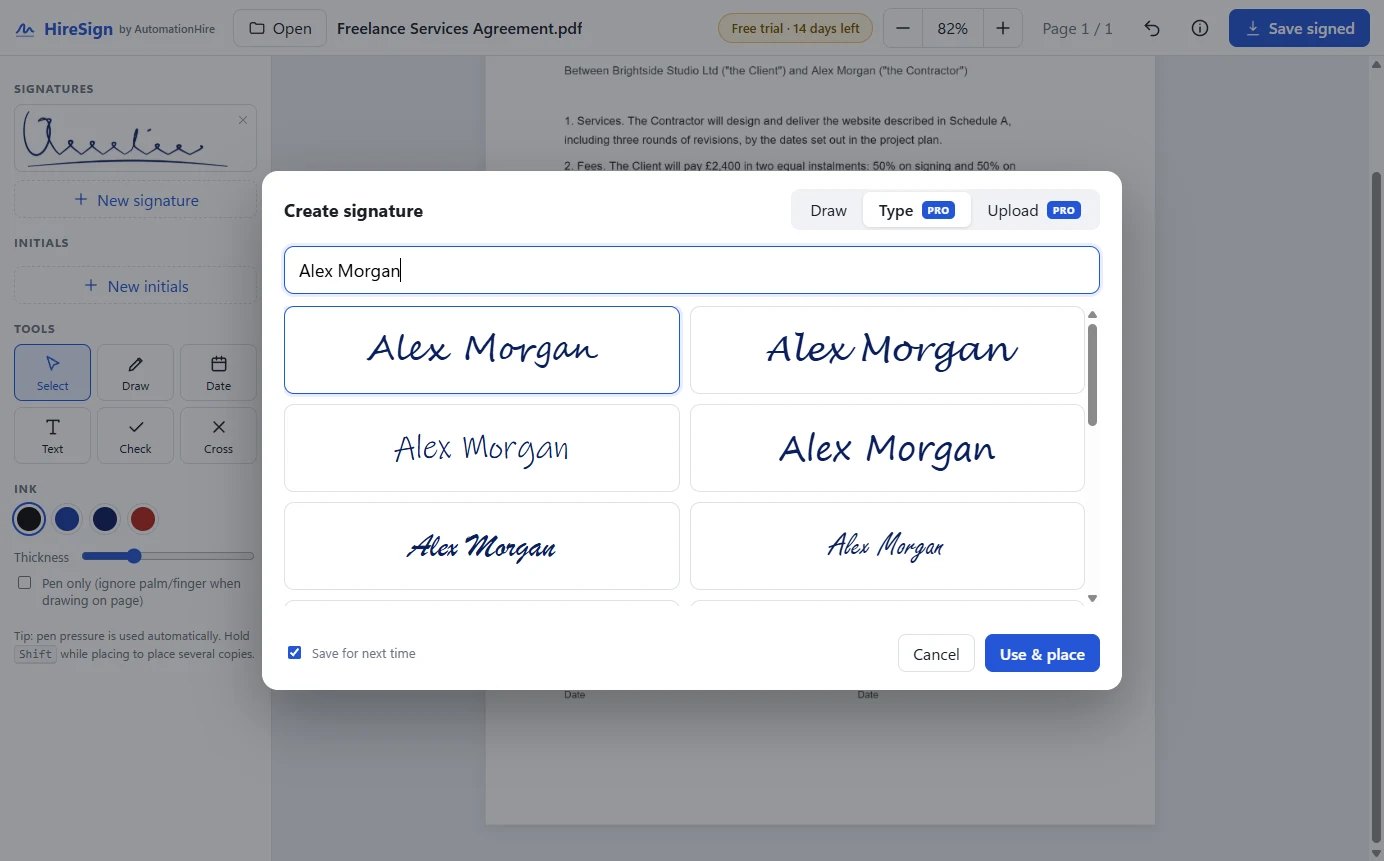
Typed signature styles in HireSign
Pro: type your name in a handwriting style, or upload a photo of your signature

HireSign or Pro?

FeatureHireSign · £1HireSign Pro · £9.99
Sign PDFs and images (PNG, JPG)✓✓
Draw your signature with mouse, pen or touch✓✓
Initials, today's date, text, ticks and crosses✓✓
Write freehand anywhere on the page✓✓
Save signed PDFs✓✓
Sign Word (.docx) documents14-day trial✓
Save back to Word, or Word to PDF14-day trial✓
Type your signature in a handwriting style14-day trial✓
Upload a photo of your signature (background removed)14-day trial✓

Every HireSign download includes the Pro features free for 14 days. After that, £1 owners keep everything in the first column, and can upgrade to Pro for £8.99 at any time.

Built with AI — and tested by it

HireSign started as one line typed to Claude Code: "can you create me an app that makes digital signature on document such as word pdf easier? using mouse or digital pen or touchscreen." Claude built the signature pad, the PDF and Word signing, then drove the real app itself to test it: drawing with a simulated pen, placing signatures, saving and reopening the signed files. It caught and fixed bugs along the way, including one that would have corrupted Word files. It's a working example of what AutomationHire builds for businesses.

Requirements

SystemWindows 10 or 11, 64-bit
DownloadHireSign-Setup-1.0.0.exe — about 110 MB, installs for your user account (no admin needed). HireSign and HireSign Pro use the same installer; your key decides the edition
DocumentsPDF, PNG and JPG, plus Word (.docx) in Pro. No Microsoft Word or Adobe Acrobat needed
InputMouse, touchscreen, Surface Pen or graphics tablet. Pen pressure is used automatically
PrivacyEverything happens on your PC. Documents are never uploaded, and there's no account
LicencePerpetual, for your own PCs. Personal or commercial use

Install in a minute

  1. Buy above — you'll come straight back here with a Download button and your licence key.
  2. Run HireSign-Setup-1.0.0.exe.
  3. If Windows shows "Windows protected your PC", click More info → Run anyway. This appears for new apps from small publishers that haven't bought a code-signing certificate yet.
  4. Accept the licence and click Install. HireSign opens from your desktop or Start menu, and you'll find Sign with HireSign when you right-click a PDF or Word file.
  5. Paste your licence key when you first open HireSign: click the badge at the top right, paste, Activate. Just once per PC.

FAQ

Is it really just £1?

Yes — one payment, no subscription, no account, no adverts. You also get the Pro features free for your first 14 days.

What happens after the 14-day Pro trial?

HireSign keeps working with everything in the £1 edition: signing PDFs and images, drawn signatures, dates, initials and ticks. Word documents and typed or uploaded signatures need Pro, which is £8.99 for £1 owners.

Are my documents uploaded anywhere?

No. HireSign runs entirely on your PC. Your documents never leave it, and there's no account to create.

Is this a legally valid signature?

HireSign adds an electronic signature: your drawn, typed or uploaded signature placed on the document. In the UK, electronic signatures like this are accepted for most everyday documents, such as contracts, forms and letters. Some documents, such as certain deeds and property transfers, have special rules. If you're unsure, check with whoever asked for your signature. HireSign doesn't create certificate-based (cryptographic) digital signatures.

Does it work with a Surface Pen or graphics tablet?

Yes. HireSign reads pen pressure automatically, so your lines get thicker as you press harder. A "Pen only" option ignores your palm while you write on a touchscreen.

Does it change my original file?

No. HireSign always saves a separate signed copy, for example Contract - signed.pdf, next to the original.

Mac or Linux?

Windows only for now. Tell us if you'd like a Mac version.

Refund policy?

If HireSign doesn't install or work as described on Windows 10/11, email hello@automationhire.co.uk within 30 days for a full refund.

What's included under open-source licences?

HireSign uses Electron, PDF.js, pdf-lib, docx-preview and JSZip. Their licences are in THIRD-PARTY-NOTICES.txt in HireSign's install folder.

£1one-off · perpetual licence · no subscription
Buy — £1 →