Windows 10 / 11 · Version 1.0

HireClean PRO

Find out what's actually wrong with your PC, and fix it. HireClean Pro reads Windows' own logs for app crashes, failed updates, disk errors and broken services, offers one-click fixes, and cleans junk on every drive you own. Plus everything in HireClean.

£9.99one-off · perpetual licence · no subscription
Buy Pro — £9.99 →
Already bought HireClean for £1? Upgrade for £8.99.

Paste the licence key from your HireClean purchase page and you only pay the difference.

Upgrade to Pro — £8.99 →
🩺 PC IssuesApp crashes, failed Windows updates, disk errors and unexpected shutdowns, read from Windows' own logs
🔧 One-click fixesReset Windows Update, restart Search or Audio, clear the DNS cache, check the disk
🛡️ Protection checkWarns when virus protection is off or out of date, and when a device has a driver problem
💽 Every driveThumbs.db, macOS leftovers, old .tmp files, crash dumps and disk-check fragments on D:, E: and USB drives
📦 Biggest filesYour files over 1 GB, listed so you can send the ones you don't need to the Recycle Bin
✨ Everything in HireCleanHealth Check, Custom Clean and Startup Manager
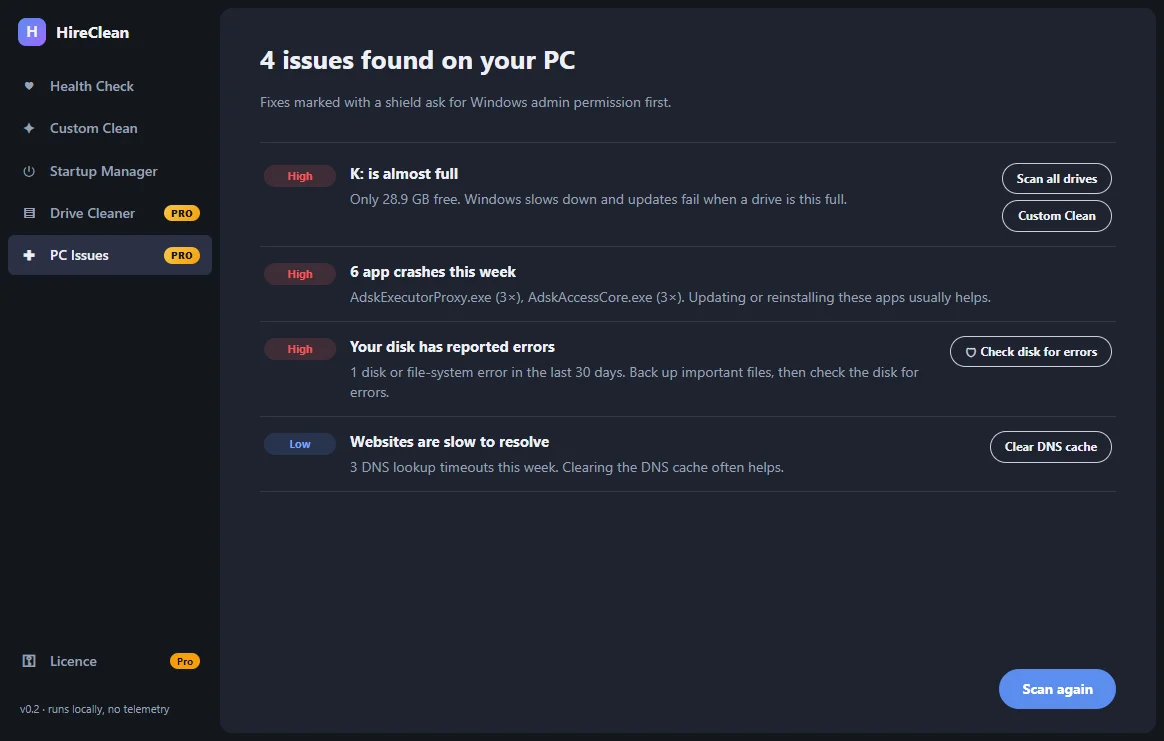
HireClean Pro PC Issues listing a full drive, app crashes, a disk error and DNS timeouts with fix buttons
Real screenshot: PC Issues on our test PC, with a fix for each issue.
See it in action

HireClean Pro PC Issues
PC Issues: what's wrong, how serious it is, and a fix for each. Shield buttons ask Windows for permission first
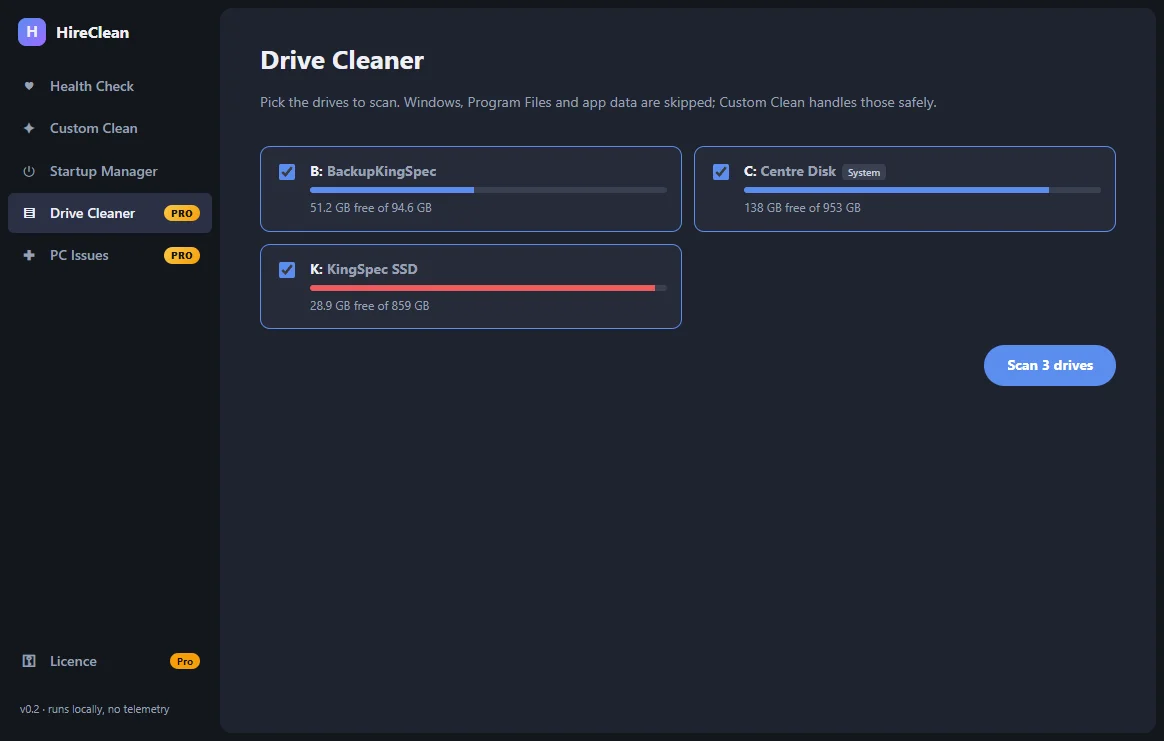
HireClean Pro Drive Cleaner drive picker
Drive Cleaner: pick any of your drives, with free space at a glance
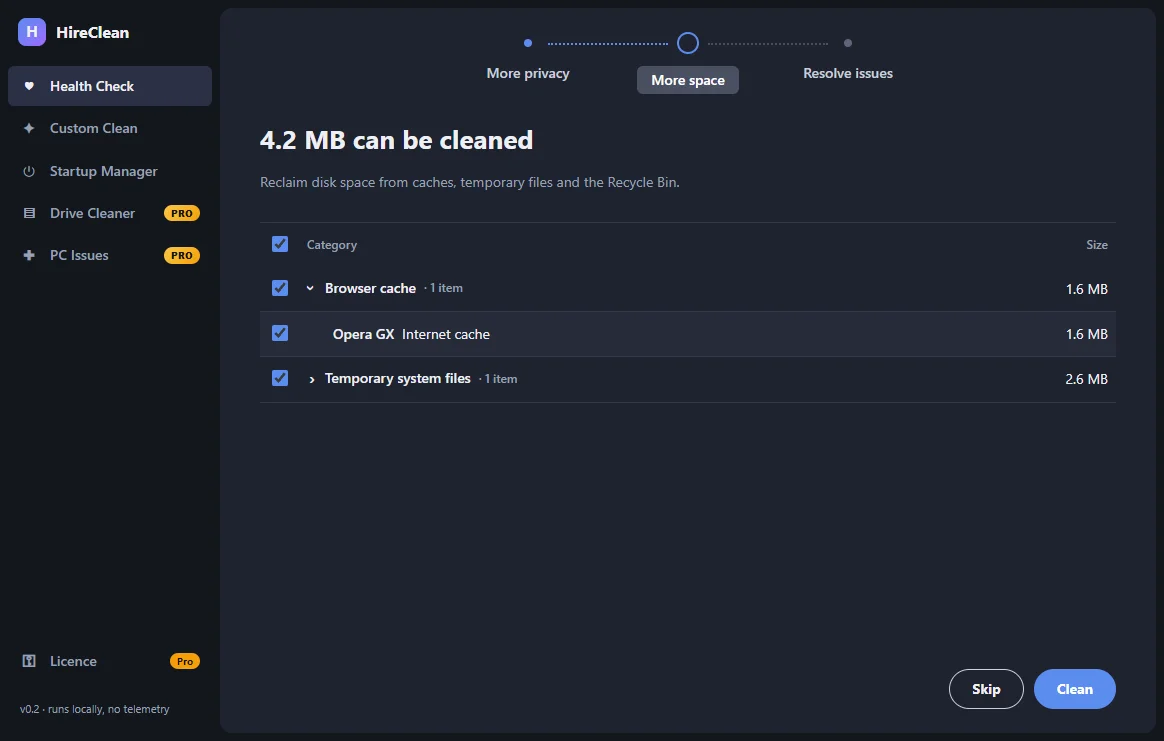
Health Check space step
Health Check, included: caches, temp files and app caches, sized before you clean
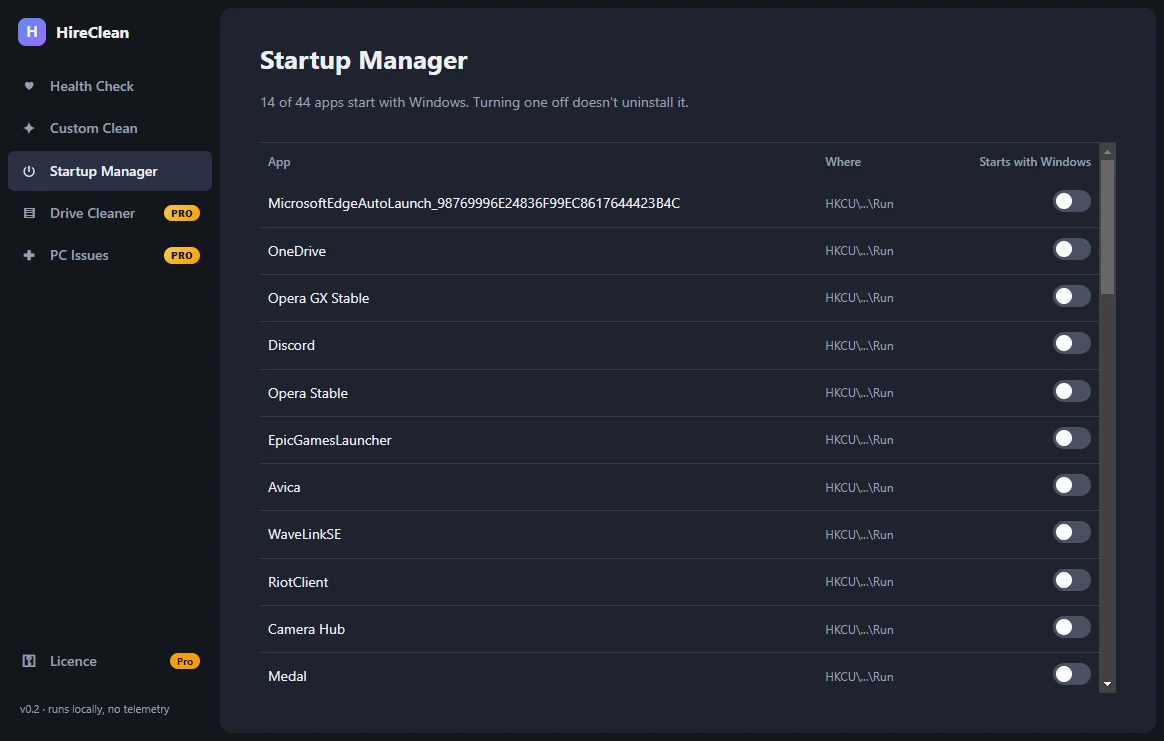
HireClean Startup Manager
Startup Manager, included: switch apps off and on without uninstalling them

HireClean or Pro?

FeatureHireClean · £1HireClean Pro · £9.99
Health Check: browsing traces, caches, temp files and the Recycle Bin, reviewed before anything is removed✓✓
Custom Clean: Chrome, Edge, Firefox, Brave, Opera, Vivaldi, Windows, Discord, Steam, VS Code, Spotify and more✓✓
Startup Manager: turn off apps that slow down boot (and back on again)✓✓
Drive Cleaner: junk on every drive, including D:, E: and USB drives—✓
Your largest files, listed so you can send them to the Recycle Bin—✓
PC Issues: app crashes, failed updates, disk errors, Windows Search, audio, DNS, antivirus and driver problems—✓
One-click fixes: reset Windows Update, restart services, clear DNS, check the disk—✓

£1 owners can upgrade to Pro for £8.99 with the box at the top of this page. Same app: your Pro key simply unlocks the extra features.

Safe by design

  • You see everything first. Every scan shows what it found, by category and app, before anything is deleted.
  • Sensible defaults. Cookies, open tabs and jump lists are left alone unless you tick them, so you don't get signed out of websites. Firefox history isn't touched because it shares a file with your bookmarks.
  • No surprises. Temporary files from the last 24 hours are kept, open apps are asked to close first, and HireClean never follows shortcuts or links out of the folders it cleans.
  • Reversible where it matters. Turning off a startup app doesn't uninstall it, and large files go to the Recycle Bin, not straight to deletion.

Built with AI — and tested by it

HireClean was built by Claude Code for AutomationHire after studying how popular PC cleaners work, with its own cleaning rules written from scratch. Claude tested it by scanning a real PC without deleting anything, and by cleaning throwaway test folders to prove it only removes what it lists and never escapes a folder through a link. It's a working example of what AutomationHire builds for businesses.

Requirements

SystemWindows 10 or 11, 64-bit
DownloadHireClean-Setup-1.0.0.exe — about 80 MB, installs for your user account (no admin needed). HireClean and HireClean Pro use the same installer; your key decides the edition
CleansChrome, Edge, Brave, Vivaldi, Opera, Opera GX and Firefox; Windows temp files, error reports, crash dumps, recent documents and the Recycle Bin; Discord, Slack, Steam, Spotify and VS Code caches; optional NVIDIA/AMD shader and npm/pip/Yarn caches
PrivacyEverything happens on your PC. Nothing is uploaded, there's no account, and it works offline
LicencePerpetual, for your own PCs. Personal or commercial use

Install in a minute

  1. Buy above — you'll come straight back here with a Download button and your licence key.
  2. Run HireClean-Setup-1.0.0.exe.
  3. If Windows shows "Windows protected your PC", click More info → Run anyway. This appears for new apps from small publishers that haven't bought a code-signing certificate yet.
  4. Accept the licence and click Install. HireClean opens from your desktop or Start menu.
  5. Open Licence at the bottom of the sidebar, paste your Pro key and click Activate. Just once per PC.

FAQ

I already bought HireClean for £1. Do I pay £9.99?

No — paste your HireClean licence key into the upgrade box at the top of this page and Pro costs £8.99, the difference. You get a new Pro key; paste it into HireClean's Licence page and the Pro features unlock straight away.

Does PC Issues change my system?

Only when you click a fix. Scanning just reads Windows' logs. Fixes that need administrator rights, like resetting Windows Update or checking the disk, show the normal Windows permission prompt first.

Will it delete my big files?

No. Large files are only listed; nothing is ticked for you. The ones you tick go to the Recycle Bin, so you can restore them. Files on USB drives, which have no Recycle Bin, are never removed by HireClean.

Will it delete anything I need?

HireClean only removes caches, temporary files and traces that apps recreate on their own, and it shows you the list first. Things you might miss, like cookies (which keep you signed in) and your open tabs, are unticked until you choose them.

Can I try it before activating?

Yes. Without a key HireClean scans and shows what it would clean; the key unlocks cleaning.

Mac or Linux?

Windows only for now. Tell us if you'd like a Mac version.

Refund policy?

If HireClean doesn't install or work as described on Windows 10/11, email hello@automationhire.co.uk within 30 days for a full refund.

What's included under open-source licences?

HireClean uses Electron and React. Their licences are in THIRD-PARTY-NOTICES.txt in HireClean's install folder.

£9.99one-off · perpetual licence · no subscription
Buy Pro — £9.99 →