AutoCAD Plant 3D · 2024 – 2027

Cable Tray Catalog for AutoCAD Plant 3D

A parametric cable-tray, ladder, trunking and wire-basket catalog with a one-click installer. Parts render as proper rectangular tray sections — not circular pipes — thanks to the bundled shape-script registration patch.

£49.99one-off · single seat · perpetual licence
Buy — £49.99 →
2704 size records15 widths (50–1000 mm) × 3–4 heights × 3 lengths + fittings
4 product familiesCable tray, cable ladder, trunking, wire basket
All standard fittingsElbow (H / up / down), tee, cross, reducer (conc / ecc), Z-riser, coupling
Rectangular geometryUses Plant 3D's squareconduits shape scripts (CSQKZ, CSQKKZ, CSQTKZ …)
One-click installerElevated PowerShell script with backup, rollback and version auto-detect
44 preview PNGs640 px isometric family previews for the parts palette

Delivered as a 2.7 MB ZIP: catalog (.pcat), spec (.pspx/.pspc), previews, ScriptGroup patch, installer/uninstaller, INSTALL.txt and LICENCE.txt.
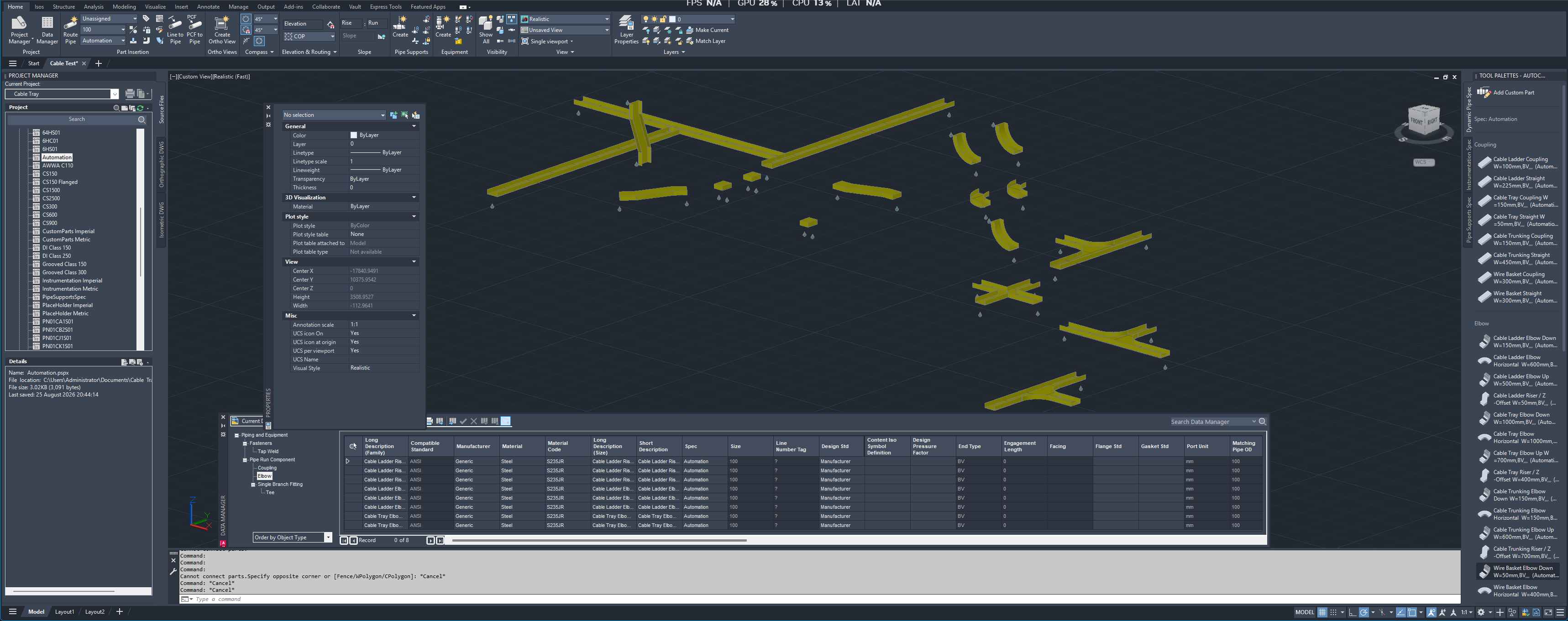
Cable tray fittings routed in AutoCAD Plant 3D using the AutomationHire pack

Live 3D preview — powered by Articraft

Every part in the catalog is generated from a Python parametric model. Below is the same generator running live in your browser — pick a product type, fitting and width to see the geometry rebuild in real time. This is the raw geometry the Plant 3D CSQ shape scripts produce at drawing time.

Loads 56 pre-generated GLB variants (4 product types × 7 fittings × 2 widths ≈ 3 MB). The same Python library is what generates the 2704-row Plant 3D catalog you'll install from the pack.

What's inside the pack

FilePurpose
AutomationHire.pcatThe parametric catalog. 2704 size records across 44 part families.
Automation.pspx
Automation.pspc
Ready-made spec that references the catalog. Add it to your Plant 3D project and start routing.
previews/ (44 PNG)640 px isometric preview per family, shown in the Catalog Builder and parts palette.
ScriptGroup_supplemental.xml32 CSQ entries added to Plant 3D's ScriptGroup.xml so the router uses the rectangular shape scripts.
install.ps1Elevated installer: auto-detects your Plant 3D content folder, copies files, rewrites the spec's catalog path, patches ScriptGroup with a timestamped backup.
uninstall.ps1Reverses the install and restores the most recent ScriptGroup backup.
INSTALL.txtEnd-user instructions.
LICENCE.txtCommercial licence, English law, 90-day support, 30-day refund.

Size matrix (EN / IEC-style)

Width (mm)Heights (mm)Lengths (mm)
50, 75, 10035, 50, 602000, 3000, 6000
150, 200, 22550, 60, 75, 1002000, 3000, 6000
300, 400, 450, 50060, 75, 100, 1502000, 3000, 6000
600, 700, 800, 900, 100075, 100, 1502000, 3000, 6000

Standard lengths chosen from common commercial stock. Fittings (elbow, tee, cross, reducer, riser, coupling) share the same width/height matrix so every straight has matching fittings in the spec.

How to install (30 seconds)

  1. Close AutoCAD Plant 3D.
  2. Extract the ZIP anywhere on your machine.
  3. Right-click install.ps1Run with PowerShell (as Administrator).
  4. Restart AutoCAD Plant 3D.
  5. Project Manager → Project Setup → Cable Trays → add Automation.pspx as a spec.

The installer auto-detects your Plant 3D version (2024–2027), makes timestamped backups of anything it replaces, and refuses to run while AutoCAD is open — no way to break your machine.

FAQ

Why do parts come in circular by default in Plant 3D?

AutoCAD Plant 3D ships the rectangular "squareconduits" shape scripts inside variants.zip, but does not register them in ScriptGroup.xml. Without registration the router falls back to the circular pipe engine. This pack adds 32 CSQ entries to ScriptGroup.xml under matching pipe/elbow/tee groups so the router recognises them.

Which Plant 3D versions are supported?

AutoCAD Plant 3D 2024, 2025, 2026 and 2027. The shape scripts are present in variants.zip on all of these versions. If your install is on a non-default drive, pass -Plant3DContent "D:\..." to install.ps1.

Do I keep working if I later update Plant 3D?

Yes. Only ScriptGroup.xml is edited on the Plant 3D install (with a timestamped backup). If a Plant 3D update rewrites that file, just re-run install.ps1 to re-apply the patch.

Can I modify the catalog?

Absolutely. Open the .pcat in Plant 3D's Catalog Builder and add sizes, change material metadata, adjust prices — whatever you need. The licence permits internal modification.

Refund policy?

30 days: if the pack fails to install or operate as documented on a supported Plant 3D version, email support@automationhire.co.uk for a full refund.

£49.99one-off · single seat · perpetual licence
Buy — £49.99 →