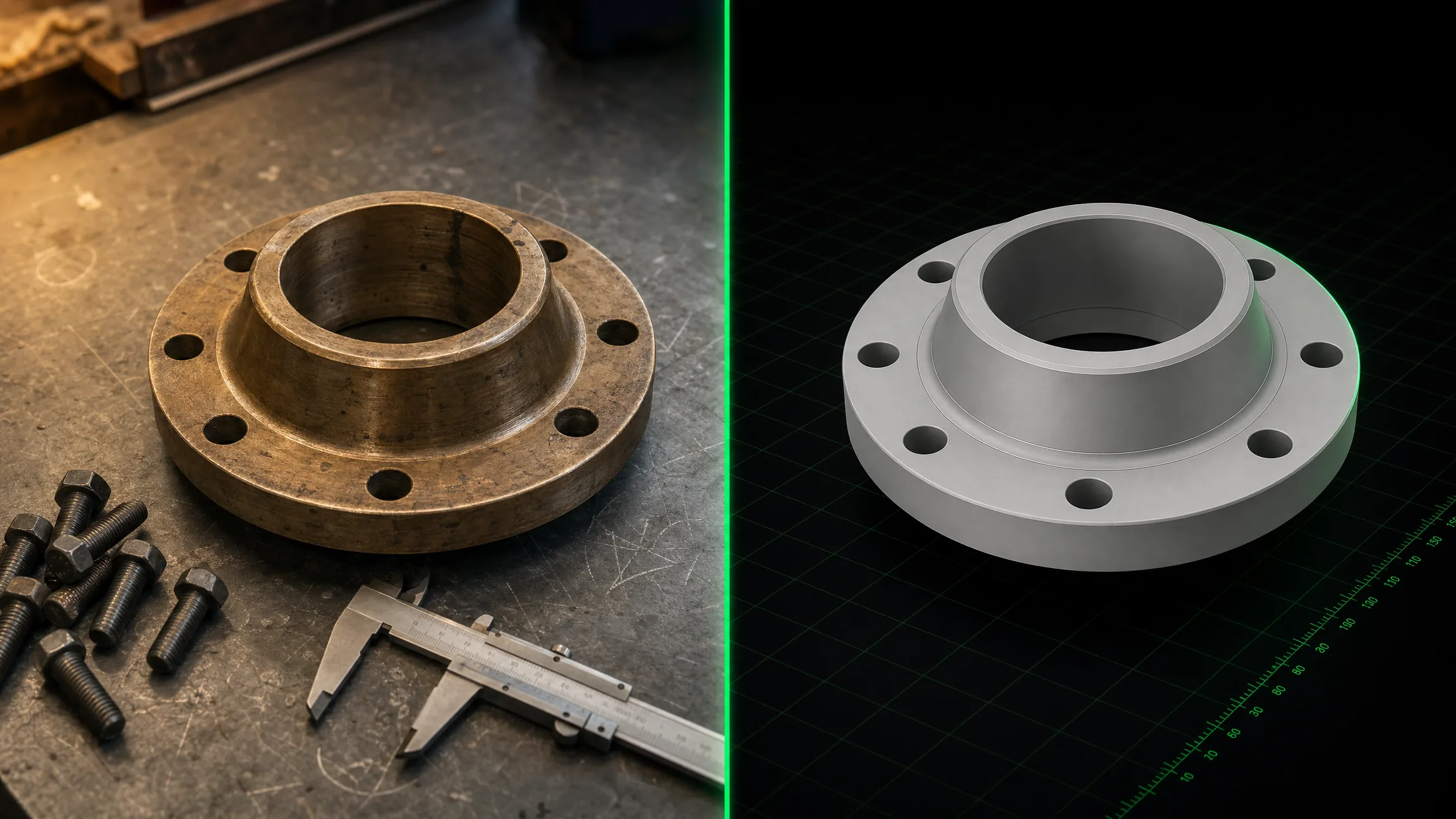
PartForge uses AI to turn photos of real components and assemblies into
production-ready 3D CAD files — importable into Plant 3D, SolidWorks,
Inventor, and FreeCAD. No modelling skills required.
No modelling skills, no software install. Upload, describe, download.
01
📸
Upload a photo or describe your component
Drag in a photo of any real component — a valve, pump, skid, fitting, enclosure — or simply describe it in words. The more detail you give, the better the geometry.
02
⚙️
AI generates parametric 3D geometry
PartForge uses Claude vision AI to extract dimensions and geometry from your photo, then Articraft generates a parametric CadQuery model compiled against OpenCascade OCCT — producing true B-Rep solids, not just meshes.
03
📦
Preview interactively, download your files
Review the articulated 3D model in your browser with joint controls. Then download STEP for Plant 3D / SolidWorks / Inventor, URDF for digital twins, or OBJ/STL for visualisation and 3D printing.
Live ExampleBall Valve G 1-1/4" — 32 mm Full BoreGenerated from spec · drag to rotate · scroll to zoom
Full skid systems — manifolds, filter banks, control enclosures, piping runs.
📦
Enclosures & Panels
IP65 control panels, terminal boxes, DIN rail enclosures with cutouts and mounting.
🔄
Gears & Transmission
Spur gears, bevel gears, pulley systems — parametric tooth profiles.
🏗️
Structural Brackets
Steel brackets, gussets, support frames — with bolt holes and weld pads.
🎛️
Instrumentation
Pressure gauges, flow meters, transmitters — with accurate dial faces and connections.
🔩
Pipe Supports
U-bolt clamps, clevis hangers, riser clamps and trapeze supports — with correct bore sizes, rod diameters and load ratings for standard pipe schedules.
📐
Cable Trays
Ladder tray, perforated tray and solid-bottom sections — with splice plates, tee pieces and reducers. Correct rail height, rung pitch and fitting geometry for OCCT export.
Pricing
Simple, honest pricing
Pay for what you use. All plans include interactive 3D preview and lifetime access to your generated files.
Need bulk generation, on-premise deployment, or custom catalog formats?
Talk to us →
FAQ
Common questions
PartForge generates STEP (ISO-10303-21), URDF, OBJ, and STL. Pro users also receive an AutoCAD Plant 3D .pcat catalog entry. STEP files use true B-Rep solid geometry via the OpenCascade OCCT 7.8 kernel — not tessellated meshes — so they import cleanly into Plant 3D, SolidWorks, Inventor, Catia, and FreeCAD.
Accuracy depends on the quality of your input. With a clear photo and a description that includes key dimensions (e.g. "DN50 bore, 200 mm face-to-face"), the model will match within 2–5%. For free-tier text-only generation, proportions are realistic but not to exact engineering tolerances. For critical engineering use, always verify against manufacturer datasheets before use in production design.
Simple single-part components take 5–10 minutes. Complex multi-part assemblies (like a full hydraulic skid) take 20–45 minutes. Pro tier uses high-quality multi-turn AI reasoning for best results. Premium uses medium thinking. Free uses fast mode. You'll receive an email notification and can also poll the live progress bar in the browser.
PartForge is built on Articraft, an open-source agentic 3D generation system, combined with CadQuery (a Python CAD API over OpenCascade) and Claude AI (Anthropic) for geometry reasoning. The pipeline: Claude vision extracts geometry from your photo → Articraft generates a parametric Python model → CadQuery compiles it to B-Rep solids → exported as STEP/URDF/OBJ/STL.
Yes. Premium and Pro tiers support assemblies. The AI generates each part as a separate body with correct relative positioning, and the URDF output includes full articulation definitions (e.g. a valve handle that rotates, filter canisters that unscrew). You can load the URDF in Gazebo, ROS, or any robotics simulation environment, or use the STEP assembly in your CAD package.
You do. All generated files are yours to use commercially without restriction. We do not claim any IP in the output geometry. Your uploaded photos and prompts are used solely to generate your model and are not used to train AI models.
Yes — Pro tier includes REST API access. You can POST a job with an image URL or base64 image and a text prompt, then poll for completion and download the output files programmatically. API documentation will be available at launch. Interested in higher batch limits? Contact us to discuss an enterprise plan.
Unused generations do not roll over to the next month. We keep it simple: your allowance resets on your billing date each month. If you need more in a given month, you can upgrade your plan at any time — prorated to the day.
⚡
Get early access to PartForge
Be first in line when we launch. Free tier users get 3 bonus generations on launch day. Premium and Pro subscribers get 30 days free.
No spam. Just a launch notification and your early-access link.